How Long Is Instagram Story A Guide For Marketers
Unlock the secrets of Instagram Story length. Find out how long is Instagram Story for videos and photos, and learn strategies to maximize engagement.
On Instagram, a single Story video can now be up to 60 seconds long without being broken up, a huge leap from the old 15-second limit. For static photos, the default display time is 7 seconds.
This update gives marketers a full minute of uninterrupted storytelling, but the real secret to success isn't just using the maximum time—it's about knowing what actually keeps your audience watching.
Understanding Instagram Story Time Limits

Mastering Instagram Stories starts with understanding the rules of the road. While the platform gives you a longer leash, viewer behavior paints a much different picture of what truly works. The trick is to find the perfect balance between what’s possible and what’s practical for keeping people engaged.
When Instagram quadrupled the video limit to 60 seconds, it was a game-changer for creative freedom. No more awkward cuts every 15 seconds.
But here’s the reality check: data shows that the 7-15 second sweet spot delivers an incredible 70-80% completion rate. Push much longer than that, and you'll often see more than half your audience drop off before the end.
Of course, time is only one piece of the puzzle. Getting the visual specs right is just as critical. For a deep dive into dimensions, aspect ratios, and safe zones, this Ultimate Guide to Instagram Stories Size is an excellent resource.
Instagram Story Time Limits at a Glance
To make it simple, here’s a quick summary of the technical limits versus what actually holds attention.
| Content Type | Maximum Duration (Single Segment) | Optimal Engagement Length |
|---|---|---|
| Video Clip | 60 seconds | 7-15 seconds |
| Still Image | 7 seconds (default) | 5-7 seconds |
Think of these numbers as your guideposts. You can post a full 60-second clip, but if your goal is to make sure your message lands, keeping it short, punchy, and under 15 seconds is almost always the smarter play.
How Instagram Handles Videos Over 60 Seconds
So, you've got a killer video that runs longer than 60 seconds and you want to post it to your Story. Do you need to fire up an editing app and start chopping it into smaller pieces?
Thankfully, no. Instagram takes care of the heavy lifting for you.
Think of it like this: when you upload a video longer than a minute, Instagram acts as a smart editor, automatically slicing your clip into connected 60-second segments that play back-to-back. The process is pretty slick, but understanding exactly how it works is the key to making sure your content flows smoothly for your viewers.
The Automatic Splitting Process Explained
Let's walk through a real-world example. Say you have an amazing 90-second client testimonial you’re excited to share.
Here’s what happens behind the scenes when you upload it to your Story:
- Upload the Full Clip: You just grab the entire 90-second video from your camera roll and add it to your Story editor.
- Instagram Does the Math: The app instantly sees the video is over the limit and splits it. The first Story slide becomes a full 60-second clip.
- The Rest Follows: That leftover 30 seconds is automatically turned into a second Story slide that plays right after the first one finishes.
Key Takeaway: Your audience will see two consecutive Stories pop up in their feed—a 60-second clip followed by a 30-second one. The handoff is automatic, but it's not always perfect.
This is where a little bit of planning goes a long way. To avoid an awkward cut that chops someone off mid-sentence or interrupts a cool visual, you need to think about that 60-second mark while you're creating your video.
Make sure the break point feels natural. A well-planned video flows seamlessly across these automatic cuts, making viewers want to keep tapping to see what happens next instead of getting confused and swiping away.
Why Completion Rate Is Your Most Important Metric
It's easy to get caught up in tracking views and likes, but those vanity metrics don't paint the full picture. If you want to know what really works on Instagram Stories, the single most important metric to watch is the completion rate.
This number is the ultimate test of your audience's attention. It's calculated with a simple formula: (final frame views ÷ first frame views) × 100. In plain English, it tells you what percentage of people stuck around from the very first second to the absolute last.
A high completion rate is a powerful signal to the Instagram algorithm that your content is genuinely engaging. When the algorithm sees people watching all the way through, it's far more likely to push your future Stories to a wider audience, boosting your overall reach.
Nailing this is key if you want to increase social media engagement and build a community that actually cares about what you post.
The Impact of Video Length on Completion
The data doesn't lie: as video length goes up, completion rates go down. A lot.
Shorter Stories almost always perform better. We're talking clips between 3-7 seconds that can hit incredible 80-90% completion rates. But stretch that out past 15 seconds, and you'll see that number drop off a cliff, often down to just 50-70%. People on Stories want quick, punchy, and valuable content they can digest in a flash.
When you upload a longer video, Instagram automatically chops it up for you. While convenient, this creates natural exit points for your viewers.
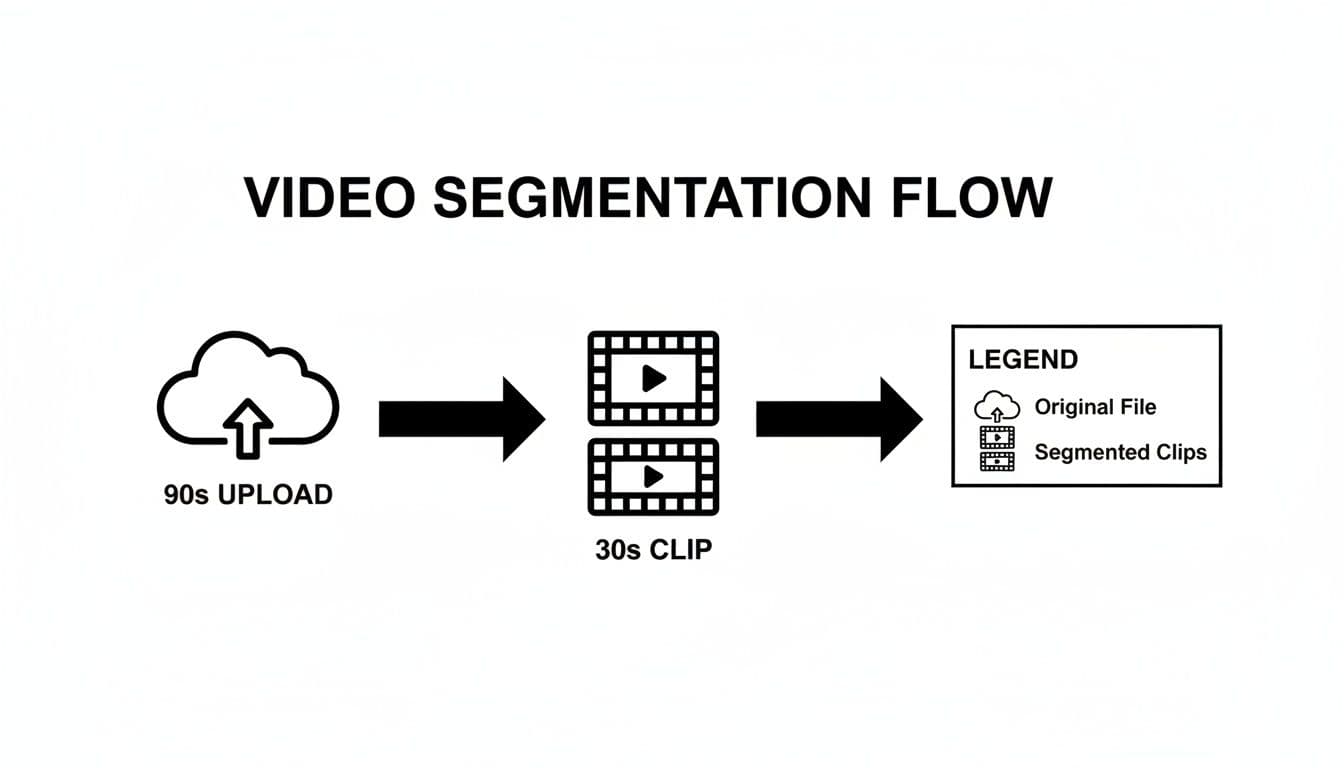
Each one of those automatic cuts is a chance for someone to get bored and swipe away. This makes the first few seconds of your very first clip absolutely critical—you have to give them a reason to keep watching. If your opening is weak, you've lost them before they even get to the next segment.
Struggling to come up with an opening that grabs attention? A tool like Proom AI’s hook generator can give you a creative spark. You can check it out here: https://proom.ai/tools/hook-generator
Ready to create video ads?
Turn your photos into scroll-stopping ads in minutes. No video editing skills required.
Try For FreeChoosing Between Stories, Reels, and Highlights
Navigating Instagram's video formats can feel like you're standing in front of a toolkit—each tool looks useful, but picking the right one for the job is what really matters. Knowing when to post a Story versus a Reel or a Highlight is the key to a content strategy that actually works. Make the right choice, and your message lands exactly how you intended.
Here’s a simple way to think about it: Stories are for conversation, Reels are for discovery, and Highlights are for your portfolio. Stories are where you share the raw, unpolished, behind-the-scenes stuff that builds a real connection with the people who already follow you. Their temporary nature creates a sense of "you had to be there" intimacy.
The Role of Reels and Highlights
Reels, on the other hand, are your blockbuster movie trailers. They’re designed for maximum reach and pure entertainment, using trending audio and slick edits to grab the attention of people who have never heard of you. The entire point of a Reel is to get discovered by new audiences through the Instagram algorithm.
Then you have Highlights, which serve a totally different purpose. Think of them as a curated "greatest hits" collection right on your profile. By saving your best Stories to a Highlight, you create an evergreen resource for new visitors to quickly understand your brand, see your best work, or get answers to common questions.
Key Takeaway: The format you choose should be a direct answer to your goal. Trying to engage your current followers with a quick update? A Story is perfect. Trying to go viral and attract new eyes? A Reel is your best bet.
Instagram Video Format Comparison
To build a strategy that feels cohesive, you need to understand the practical differences in how long each format lasts, their length restrictions, and what they're built to accomplish. This quick comparison should help clarify which tool to grab for which job.
For brands that use a lot of authentic creator content, deciding where to showcase these videos is a big deal. You can get a deeper look at how to make UGC work for your brand in our detailed guide.
| Feature | Instagram Stories | Instagram Reels | Story Highlights |
|---|---|---|---|
| Lifespan | 24 hours | Permanent | Permanent |
| Max Length | 60 seconds | 90 seconds | 60 sec per clip |
| Primary Audience | Current Followers | New Audiences | New Profile Visitors |
| Main Goal | Engagement & Urgency | Discovery & Reach | Showcasing & Info |
Ultimately, each format plays a unique role. Stories build loyalty, Reels drive growth, and Highlights create a lasting first impression. Using them together is how you build a powerful presence on the platform.
Mastering Story Timing With Proom AI

Knowing the theory behind Instagram Story length is one thing. Actually producing a steady stream of content that hits that high-engagement sweet spot is a whole different ballgame. That’s where the right tools can bridge the gap between knowing what to do and actually getting it done.
This is exactly why we built Proom AI. It’s designed to help you generate perfectly timed video ads from the photos you already have, and it only takes a few minutes. Instead of wrestling with editing software, you can kickstart the process with templates already built for the mobile-first experience.
This simple workflow gets your content aligned with best practices right out of the gate, keeping your production process incredibly fast and effective.
Creating Videos for the Engagement Sweet Spot
The goal is to consistently land your content in that optimal 7 to 15-second range. Tools like Proom AI are built to do this by design, guiding you through a process that respects how short your audience's attention span really is.
Here’s a quick look at how it works:
- Pick an Industry Template: Start by choosing a pre-built template made specifically for sectors like real estate or e-commerce.
- Upload Your Photos: Just add your best product shots, portfolio images, or behind-the-scenes snaps.
- Generate Your Video: The AI takes over, assembling a dynamic, fast-paced video complete with AI-scripted hooks and calls-to-action that fit the perfect Story length.
This approach means you’re not just making a video—you're producing a performance-ready asset built to drive engagement on Stories. By adding AI presenters or even custom influencers, you can craft professional ads that feel authentic and stop the scroll.
If you're new to this, getting a feel for how to make AI videos provides a great foundation. Ultimately, this method allows you to churn out high-quality, perfectly timed Story ads in a tiny fraction of the time it would take with traditional editing software.
Got Questions About Instagram Story Length? We Have Answers.
Let's clear up some of the most common questions marketers run into with Instagram Stories. Think of this as your go-to cheat sheet for nailing the details and making sure your strategy works in the real world.
These are the practical, everyday scenarios you’re bound to face.
Can You Post a 2-Minute Video to an Instagram Story?
Yes, you absolutely can. If you upload a 2-minute (120-second) video, Instagram will automatically chop it into two 60-second segments for you. They’ll play one after the other in your Story, creating a seamless experience.
Viewers will watch the first minute, and it will flow right into the second. Just keep in mind that attention spans are short. If you're going to post a longer video, make sure your hook or most important message lands within the first 7-15 seconds. That’s your best shot at getting people to watch all the way through.
What Is the Best Length for an Instagram Story Ad?
When it comes to Story ads, shorter is almost always better. The sweet spot is a tight 7 to 15 seconds. This window is proven to capture attention and deliver the highest completion rates, which often hit between 70-80%.
Keeping your ad punchy ensures your call-to-action (CTA) actually gets seen before people instinctively tap away. It's a non-negotiable for driving clicks and making sales.
For marketers, the takeaway is simple: go for brevity and impact. Cram all your value into those first few seconds to make sure your message is delivered and your ad spend isn't wasted. A sharp, short ad will beat a long one almost every single time.
How Do Story Highlights Affect Video Length?
Story Highlights don't actually change the length of your original clips at all. When you add a Story to a Highlight on your profile, you’re just saving the original segments (each up to 60 seconds long) and making them permanent.
This is a fantastic way to get around the normal 24-hour disappearing act. It’s perfect for creating evergreen content like portfolios, tutorials, or customer testimonials. Each individual clip inside the Highlight will still be capped at 60 seconds, just like it was when it was live in your Story.
How Many Instagram Stories Should You Post per Day?
While Instagram lets you post up to 100 Story frames in 24 hours, all the data shows this is a bad idea. Flooding your audience’s feed is a fast track to viewer fatigue and massive drop-off rates.
The sweet spot for keeping people engaged is somewhere between 1-7 Stories per day. Posting in this range keeps your brand visible without annoying your followers. It always comes down to quality over quantity—make sure every frame you post offers real value.
Ready to create perfectly timed video ads for your Stories in minutes? Proom AI turns your photos into professional, engaging videos designed to capture attention and drive results. Try it now and see how easy it is to produce scroll-stopping content at https://proom.ai.
Ready to create video ads?
Turn your photos into scroll-stopping ads in minutes. No video editing skills required.
Try For FreeStay ahead in video marketing
Join thousands of marketers getting actionable insights delivered to their inbox.
Join 5,000+ marketers. No spam, unsubscribe anytime.