How to Make Video From Photos With Music The Ultimate Guide
Learn how to make video from photos with music that engages audiences. Our guide covers everything from photo selection to final export for social media.
Turning a folder of photos into a video used to be a clunky, time-consuming process. Now? You can just upload your images, pick some music, and let a smart tool like Proom AI handle the rest. In a few clicks, that static photo collection becomes a dynamic, engaging video that’s ready to share.
Why Photo Videos Are a Marketing Must-Have
Let's be honest, in the scroll-happy world we live in, static images just don't cut it anymore. They're easy to glance over. Video, on the other hand, makes people stop and watch. Social media algorithms know this and are built to push video content to the top of the feed. Platforms like Instagram and TikTok have basically trained us to expect motion, sound, and a bit of a story.
If you're not turning your photos into videos, you're leaving engagement on the table. It’s that simple.
The Power of Music and Emotion
This is where the magic really happens. Music is what elevates a simple photo slideshow into something that tells a story and makes people feel something. The right track can completely change the vibe—it can build excitement, create a sense of luxury, or pull on the heartstrings. That emotional connection is what makes your brand stick in someone's mind.
Imagine an interior designer showing off a recent project. A series of before-and-after shots is nice, but set those same photos to an elegant, uplifting score, and suddenly you have a powerful story of transformation. That’s something a still image could never do on its own. Getting this right is a huge part of creating shareable content, which we dive into deeper in our guide on https://proom.ai/blog/what-makes-a-video-viral.
A great video is even better with great music. It's the element that adds emotion, brings out the right vibe, and makes your message truly memorable for the audience.
Leveling the Playing Field with AI
Not that long ago, making a decent video meant big budgets, complicated software, and a whole lot of time. That's just not the reality anymore. The rise of accessible AI tools has completely changed the game, putting professional-quality video within reach for small businesses, solo marketers, and anyone without a dedicated production team.
These platforms are a massive advantage because they automate the grunt work. The benefits are pretty clear:
- Speed: You can get a polished video done in minutes, not days.
- Cost-Effectiveness: Forget about expensive software subscriptions or hiring freelance editors for every little project.
- Consistency: Using templates helps you lock in a consistent brand style across all your video content, which is crucial for building recognition.
To really see what’s possible, it’s worth understanding the essential role of music videos in promotion and how that same thinking applies here. When you pair your best photos with the perfect music, you create a powerful marketing asset that actually connects with people and gets results.
Laying the Groundwork With Photos and Templates
Your journey to create a powerful video from your photos starts long before you touch a single piece of software. It all begins with the raw materials—your images and the template you choose to frame them.
Think of it this way: a video tool, no matter how good, can only enhance what you give it. The quality and coherence of your photos are the absolute foundation.
Start by gathering only your best, high-resolution images. Anything blurry or pixelated will instantly undermine the final product, screaming "amateur" regardless of the slick transitions or killer soundtrack you add later. It's also crucial to aim for visual consistency. If your brand has a specific color palette or photographic style, now is the time to lean into it. This creates a polished, intentional look, not just a random slideshow.
Curating Your Visual Story
This is where you need to think like a storyteller. What’s the narrative? Every good story has a beginning, a middle, and an end, and your photo sequence should too. You're not just showing pictures; you're guiding the viewer on a journey.
Take a real estate agent trying to sell a property. A random jumble of photos is confusing. A curated visual tour, on the other hand, is compelling.
- Beginning: A stunning exterior shot that hooks the viewer.
- Middle: A flow through the main living areas—kitchen, living room, dining space.
- End: Showcase the primary bedroom and then finish with a unique selling point, like a beautiful backyard or a breathtaking view.
This sequence tells a coherent story. It helps potential buyers mentally walk through the home, building an emotional connection that a random dump of images simply can't achieve.
Choosing the Right Template
Once your photos are selected and ordered, it's time to choose a template. This is a bigger decision than you might think. A template isn't just a background; it dictates the entire mood, pacing, and emotional energy of your video.
A fast-paced, high-energy template with quick cuts is perfect for a product launch or a flash sale. It injects a sense of urgency and excitement. In contrast, an elegant template with slow, graceful transitions is a much better fit for an interior designer's portfolio or a wedding photographer's showcase. It feels sophisticated and gives the viewer time to soak in the details.
Using a platform with industry-specific templates can give you a massive head start. For a deeper look into how AI streamlines this entire process, check out our complete guide on creating a video from photos using AI.
Your template is the backbone of your video's emotional impact. It sets the rhythm and feel before a single note of music even plays. Choosing wisely ensures your visuals and tone are perfectly aligned.
Ultimately, your goal is to match the template's energy to your core message. When you get this right—aligning your carefully curated photos with a perfectly suited template—you’ve built a rock-solid foundation. This first step is absolutely critical for making sure the final video resonates with your audience and hits its mark.
Weaving Your Story Together
Alright, you’ve picked your best photos and have a template in mind. Now for the fun part. This is where you stop thinking about a collection of images and start thinking like a storyteller. It's more than just dragging and dropping; every choice you make from here on out will shape how your audience feels and what they do next.
Think of yourself as a film editor for a moment. Your first job is to lay out the photos in an order that makes sense. If you're doing a classic "before and after" reveal, the sequence is pretty obvious. But what if you're showcasing a new product? You might want to start with a wide shot to establish the scene, then punch in for some juicy close-ups of the details, and finally, end with a lifestyle shot showing the product in use. This creates a natural flow that pulls the viewer in.
Getting the prep work right is half the battle. This simple workflow sets you up for success before you even touch the editor.
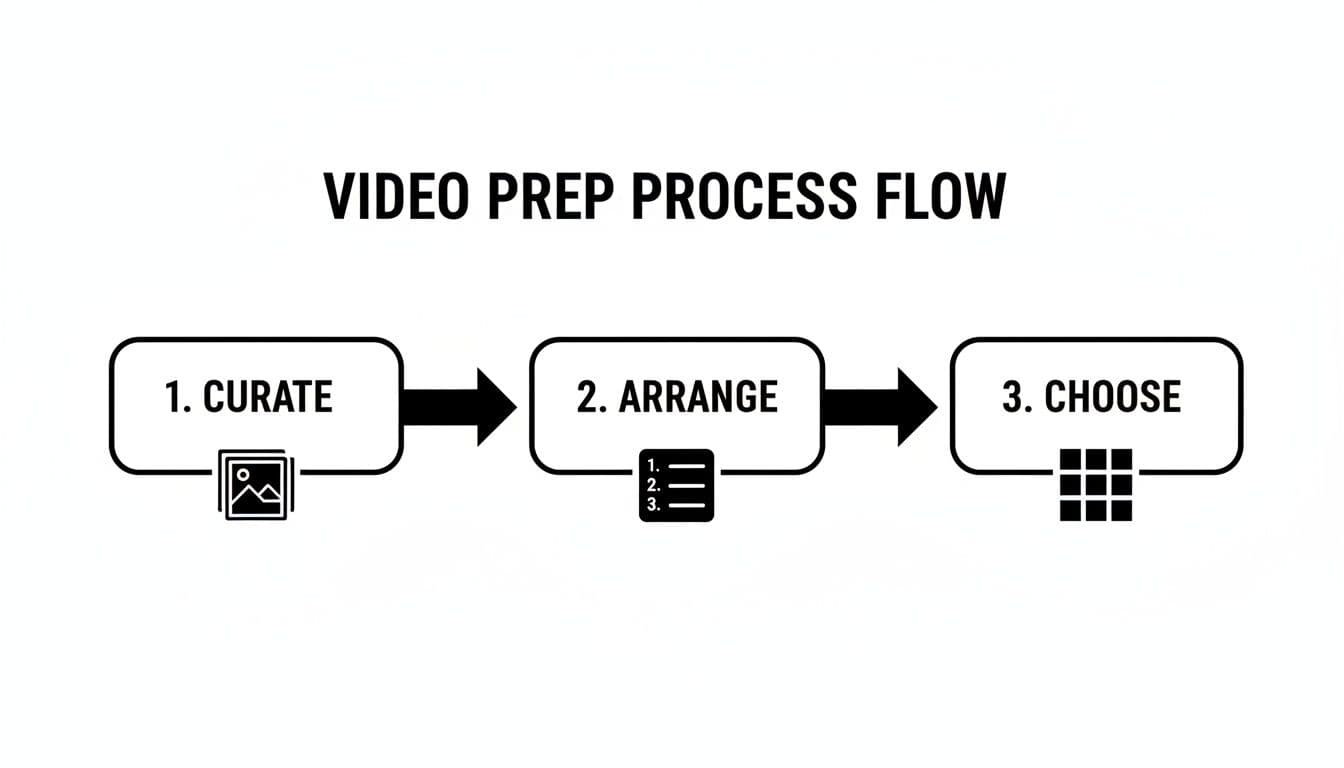
Nailing these three things first—curating your best shots, arranging them logically, and picking a template—gives your video a solid foundation to build on.
Get the Rhythm Right: Pacing and Transitions
Once your photos are in order, it's time to control the video's rhythm and energy. This comes down to two things: how long each photo stays on screen and how you move between them. Pacing is everything—it sets the entire mood.
Want to create a sense of urgency for a flash sale? A rapid-fire pace, with photos flashing for only 1-2 seconds each, will get the job done. But if you’re showing off a stunning architectural shot, you’ll want to let it breathe for 4-5 seconds so the viewer can really soak in the details. That slower pace feels more luxurious and contemplative.
Transitions are the glue that holds your scenes together. It’s tempting to go wild with all the flashy wipes and spins, but trust me, less is usually more. The best transitions are the ones that serve the story, not distract from it.
- A simple fade to black or a gentle cross-dissolve is pure elegance. It’s perfect for professional portfolios or heartfelt testimonials.
- A hard cut with no transition at all feels modern, clean, and energetic. It’s a great choice for fast-paced social media ads.
- Dynamic slides or wipes can inject a bit of energy and movement, which works well when you want to create a more vibrant, active feel.
The real pro move is consistency. Pick one or two transition styles that match your brand’s vibe and stick to them. Throwing in the kitchen sink just makes your video look chaotic and amateurish.
Ready to create video ads?
Turn your photos into scroll-stopping ads in minutes. No video editing skills required.
Try For FreeAdd Your Message with Text and a Clear CTA
Text overlays are your secret weapon for adding context, pointing out key features, or telling people exactly what to do next. A few well-chosen words can transform a pretty picture into a compelling piece of marketing. When you make a video from photos with music, the text is crucial for driving your point home, especially for viewers watching with the sound off.
This is where some of the newer AI tools really shine. If you’re staring at a blank screen trying to come up with a killer opening line, an AI script assistant can spit out a dozen ideas in seconds. They’re also brilliant for crafting a clear, concise call-to-action (CTA) for the end of your video, like "Shop the Collection" or "Schedule a Viewing."
The demand for this kind of quick-turn, professional-looking video content is exploding. The global Music Video Production Market was already valued at USD 11.20 billion and is on track to hit USD 20.39 billion by 2032. That growth is being fueled by businesses on social platforms who need to pump out engaging videos constantly to stay relevant. You can read more about the music video production market trends in this research report.
Finding the Perfect Soundtrack for Your Video
Let's be honest: music isn't just background noise. It's the emotional core of your video. A great track can turn a simple collection of photos into a genuine story, sparking excitement for a new product launch or bringing back warm memories in a year-in-review. It’s the difference between a slideshow people click away from and a story that sticks with them.
The trick is matching the music's vibe to the video's job. If you're dropping a flash sale announcement on Instagram, you want an upbeat electronic track with a driving beat to create a sense of urgency. But if you’re an interior designer showing off a new project, a mellow acoustic melody is going to do a much better job of conveying sophistication and calm.
Royalty-Free Libraries vs. Custom Music
When you need to make a video from photos with music, you basically have two paths: royalty-free music libraries or custom-composed tracks. For almost every marketer or small business, royalty-free is the way to go. It's a no-brainer.
Libraries built into tools like Proom AI are goldmines, offering thousands of tracks that are already cleared for commercial use. This completely sidesteps the nightmare of copyright strikes that can get your video yanked offline.
Seriously, don't mess around with the legal side of music. Using a popular song from the radio without the proper—and incredibly expensive—license is just asking for trouble. Stick with royalty-free music to keep your content safe, professional, and live.
Before you even start browsing, it’s worth getting a handle on the basics by understanding royalty-free music and its use by creators. A little knowledge here goes a long way in making smart, legally-sound choices for your brand.
To help you get started, here's a quick guide to picking the right music based on what you're trying to achieve.
Music Selection Guide for Different Video Goals
| Video Goal | Recommended Music Genre | Ideal Tempo | Target Platform Example |
|---|---|---|---|
| Drive Urgent Action (e.g., Flash Sale) | Electronic, Pop, Funk | 120-140 BPM (Upbeat) | Instagram Stories, TikTok Ads |
| Showcase a Product/Portfolio | Ambient, Chillhop, Lo-fi | 70-90 BPM (Relaxed) | YouTube Portfolio, Pinterest Video Pins |
| Create an Emotional Connection | Cinematic, Acoustic, Orchestral | 60-80 BPM (Slow, Inspiring) | Facebook Brand Story, Website Hero Video |
| Educate or Explain (e.g., How-To) | Corporate, Uplifting Pop | 100-120 BPM (Moderate) | LinkedIn Explainer Video, Blog Post Embed |
This table is just a starting point, of course. The best way to find the perfect track is to experiment, but this framework should help you narrow down your options fast.
Syncing Your Visuals to the Beat
Here’s where the real magic happens: syncing your photos to the rhythm of the music. It’s a subtle touch, but it’s what makes a video feel polished and intentional. This means timing your photo transitions to land on key moments in the song, like a drum hit, a bass drop, or a change in the melody.
The good news is you don't have to do this manually. Many modern video tools can handle the heavy lifting. Once you pick a track, the software analyzes its tempo and can automatically suggest the perfect moments to switch images. This creates a fluid, engaging rhythm that holds a viewer’s attention way better than just random cuts.
You can't overstate the power of good audio, especially today. The digital music industry, now worth a massive USD 39.02 billion, is booming for a reason—sound drives engagement. The data doesn't lie: videos with sound get 52% more views, and the right background track can increase emotional connection by a jaw-dropping 65%. With 80% of all social traffic in major markets being video, pairing your photos with the perfect soundtrack isn't just a nice extra. It's a core marketing strategy.
Finalizing and Exporting for Maximum Reach
You’ve done the creative work—you’ve arranged your photos, dialed in the music, and built a story. Now for the last hurdle: getting your video out into the world. How you finalize and export your project is just as important as how you build it. It directly impacts how your video looks, where it can be seen, and whether or not it performs.
The first big decision is the aspect ratio. This isn’t just some technical jargon; it's about making sure your video fits the screen where your audience is actually watching. A one-size-fits-all approach just doesn't cut it anymore.
Choosing the Right Aspect Ratio
Think of the aspect ratio as the shape of your video’s canvas. Different social platforms are built for different shapes, and if you get it wrong, you end up with those awkward black bars that scream "amateur." Matching the ratio to the platform makes your video feel native and instantly grabs more attention.
Here’s a quick cheat sheet for the main formats:
- 9:16 (Vertical): This is the undisputed king of mobile. It’s the native format for Instagram Reels, TikTok, and YouTube Shorts. If you’re trying to catch the attention of the endless scrollers, this is your format.
- 16:9 (Horizontal): The classic widescreen look. It’s perfect for YouTube, embedding on your website’s hero banner, or including in a blog post. It gives you that cinematic feel, which is great for longer, more detailed content.
- 1:1 (Square): While not as dominant as it once was, the square format is still a workhorse for Instagram and Facebook feeds. It commands a solid chunk of screen real estate on a user's phone without them having to turn it sideways.
Nailing the format from the start means your most important visuals won't get clumsily cropped out when you post.
Resolution and Quality Settings
Next up is resolution. For that crisp, professional look on any screen—from a tiny phone to a huge desktop monitor—1080p (1920x1080 pixels) is the industry gold standard. It delivers fantastic clarity without creating enormous files that take forever to upload and make your viewers wait for them to buffer.
Sure, 4K is technically higher quality, but it's often complete overkill for social media and can be a pain for viewers with slower connections or limited data. When you make a video from photos with music, stick with 1080p. It’s the sweet spot between quality and performance. For a deeper dive on this, check out our guide on turning an image sequence into a polished video.
Your export settings are the final polish on your project. Choosing the right aspect ratio and resolution is like framing a photograph—it makes all the difference in how your work is perceived by the audience.
Expanding Your Reach with AI Voiceovers
To really squeeze every drop of value out of your video, think about its global potential. This is where some of the newer AI tools can give you a massive advantage, especially with features like multilingual voiceovers.
Imagine your real estate video automatically narrated in Spanish, French, or Mandarin. With a few clicks, you can open up your content to entirely new international audiences. No hiring voice actors, no booking studios.
This is part of a much bigger trend. The Generative AI in Media and Entertainment Market is on track to hit USD 11,570.0 million by 2033, and for good reason. AI-powered tools are reportedly slashing production time for marketers by as much as 90%. When you leverage these features, you’re not just finishing a project; you’re creating a scalable asset built for maximum impact.
Got Questions About Turning Photos Into Videos? We’ve Got Answers.
Stepping into video creation always kicks up a few questions. That's completely normal. Getting a handle on these basics is the difference between making a video that just sits there and one that actually gets results.
Let’s clear up some of the most common things marketers, designers, and small teams ask when they’re ready to get started.
What Is the Best Tool for My Business?
For businesses that need to create high-quality marketing content without a huge time sink, AI-powered platforms are the obvious choice. Sure, traditional video editors like Premiere Pro give you absolute control, but they also come with a massive learning curve and eat up hours of your day.
An AI tool is built for one thing: efficiency. You get access to professional templates, AI-powered scripting, and ready-to-use music libraries, letting you knock out a polished video ad in a few minutes, not a few days.
The best tool isn't the most complicated one. It's the one that gets you from a folder of images to a shareable, high-performing video the fastest. For most marketing teams, that’s an AI platform, hands down.
How Many Photos Do I Need?
There's no single magic number here. The real key is that quality always beats quantity. You need just enough photos to tell a clear story without making your audience's eyes glaze over.
Here are some good rules of thumb from what we've seen work:
- For a quick 15-30 second social media ad: Aim for 8-15 high-impact photos. This gives you enough visual variety to keep things moving at a snappy pace.
- For a longer portfolio or project showcase (60-90 seconds): You might use closer to 20-30 images to really dig into the details and show off the project's scope.
The main takeaway? Be ruthless with your selection. A powerful story built from 10 incredible shots is always going to outperform a cluttered, confusing video made from 50 average ones.
Can I Just Use a Popular Song in My Video?
This is a big one, and the answer is almost always no. Using copyrighted music from well-known artists without getting a proper license is a massive legal and financial risk.
Platforms like YouTube and Instagram have incredibly smart systems that sniff out unlicensed audio in seconds. Best case scenario? Your video gets muted. Worst case? It gets taken down, and your account gets a copyright strike against it.
The only safe and professional way forward is to use royalty-free music. Any business-focused video platform worth its salt will have a huge built-in library of tracks that are completely cleared for commercial use. This lets you add a powerful, emotional soundtrack without ever having to worry about legal takedowns.
How Do I Make Sure It Doesn't Look Like a Cheesy Slideshow?
This is the most important question of all. To elevate your video from a basic, PowerPoint-style slideshow to something truly professional, you need to nail three things: dynamic movement, cohesive branding, and rhythmic pacing.
First, start with a high-quality template. Good templates are designed by professionals and already have sophisticated transitions and subtle camera movements (like Ken Burns effects) built right in.
Second, make sure every element—from the text overlays to the color choices—perfectly matches your brand’s identity. Consistency is key.
Finally, and this is the secret sauce, sync your photo changes to the beat of the music. When a new image appears right on a drum beat or a major chord change, it creates a polished, intentional rhythm that captures and holds viewer attention. It feels less like a slideshow and more like a professionally edited piece.
Ready to turn your best photos into compelling video ads, without the headache? With Proom AI, you can create professional, music-backed videos in minutes using industry-specific templates and powerful AI features. Start creating for free and see just how simple it can be.
Ready to create video ads?
Turn your photos into scroll-stopping ads in minutes. No video editing skills required.
Try For FreeStay ahead in video marketing
Join thousands of marketers getting actionable insights delivered to their inbox.
Join 5,000+ marketers. No spam, unsubscribe anytime.